Run command as superuser:
awk -F: '{ print $1 }' /etc/passwd
More...
Check user UID minimum on system by useradd command:
grep "^UID_MIN" /etc/login.defs
in my systemoutput is 500
Check user UID maximum on system by useradd command:
grep "^UID_MAX" /etc/login.defs
in my system output is 6000
So, we can check user list by:
awk -F':' -v "min=500" -v "max=60000" '{ if ( $3 >= min && $3 <= max ) print $0}' /etc/passwd
Example output in my virtualbox CentOS:
Search This Blog
Showing posts with label Linux. Show all posts
Linux Di Virtualbox: FTP Server Simulation
In this posting, we are going to learn how to install a File Transfer Protocol (FTP) server VSFtpd on Linux.
Linux Di Virtualbox: Basic Installing Trio Apache+PHP+MySQL
Installing Apache, PHP and MySQL on Linux (And almost all software package) is easy, thanks to YUM package manager. You only need to to execute command as root or sudo:
#yum install httpd php mysql
... and YUM will take care all of package dependency for you. Godbye 'depedency hell' :)
#yum install httpd php mysql
... and YUM will take care all of package dependency for you. Godbye 'depedency hell' :)
Linux Di Virtualbox: Basic Firewall With IPTABLES
Quick cheat sheet common IPTABLES function, I often forget, so I list here :).
To turn IPTABLES on every boot automaticaly:
To check status IPTABLES: iptables -L
To delete all parameters in IPTABLES: iptables -D
# Drop ICMP echo-request messages sent to broadcast or multicast addresses
echo 1 > /proc/sys/net/ipv4/icmp_echo_ignore_broadcasts
# Drop source routed packets
echo 0 > /proc/sys/net/ipv4/conf/all/accept_source_route
# Enable TCP SYN cookie protection from SYN floods
echo 1 > /proc/sys/net/ipv4/tcp_syncookies
# Reject ICMP redirect messages, system will not reply when get ping
echo 0 > /proc/sys/net/ipv4/conf/all/accept_redirects
# Reject ICMP redirect messages
echo 0 > /proc/sys/net/ipv4/conf/all/send_redirects
# Enable source address spoofing protection, any package that pretend from internal network will be rejected
echo 1 > /proc/sys/net/ipv4/conf/all/rp_filter
# Log packets with impossible source addresses
echo 1 > /proc/sys/net/ipv4/conf/all/log_martians
To turn IPTABLES on every boot automaticaly:
/sbin/chkconfig iptables on
To check status IPTABLES: iptables -L
To delete all parameters in IPTABLES: iptables -D
# Drop ICMP echo-request messages sent to broadcast or multicast addresses
echo 1 > /proc/sys/net/ipv4/icmp_echo_ignore_broadcasts
# Drop source routed packets
echo 0 > /proc/sys/net/ipv4/conf/all/accept_source_route
# Enable TCP SYN cookie protection from SYN floods
echo 1 > /proc/sys/net/ipv4/tcp_syncookies
# Reject ICMP redirect messages, system will not reply when get ping
echo 0 > /proc/sys/net/ipv4/conf/all/accept_redirects
# Reject ICMP redirect messages
echo 0 > /proc/sys/net/ipv4/conf/all/send_redirects
# Enable source address spoofing protection, any package that pretend from internal network will be rejected
echo 1 > /proc/sys/net/ipv4/conf/all/rp_filter
# Log packets with impossible source addresses
echo 1 > /proc/sys/net/ipv4/conf/all/log_martians
Linux Di Virtualbox: Update System and Package Software
We have set our Linux guest OS to be able to access Internet on previous lesson. Now, we will try how to update our system and software package.
On modern Linux OS, there is software package management tool to make your life easier. Red Hat linux and its derivative use YUM. Debian and its derivative such as Ubuntu use apt-get software management. OpenSUSE use more advance system management tool, YasT.
Linux Di Virtualbox: Basic SAMBA Configuration With SWAT
We have successfully installed SAMBA and SWAT on our Linux guest OS. Now, we try configure basic SAMBA with SWAT. Open browser and point to our Linux guest 192.168.56.2:901, please view slides below for instructions.
Linux Di Virtualbox: Install SAMBA dengan SWAT
Continuing article Linux on Virtualbox, we will learn how to install configure SAMBA and SWAT (web based configuration tool for SAMBA). Remember , that I put ISO image of CentOS on my hardisk, so I set as following image below:
Linux Di Virtualbox: Remote Management With SSH
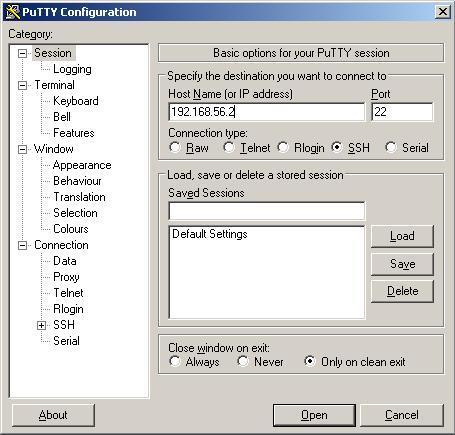
In writing the previous Linux IP settings, Windows XP as host OS is already connected to the CentOS as guest OS. This time will be shown simulated remote connection from client to server using SSH (Secure Shell Login). Windowss XP as the client and the CentOS Linux as a server. Generally, for administration management system in * NIX will use the command line.
PuTTY client software to use as a command line terminal. Remote connection in addition to SSH, can also use telnet, rlogin. However we recommend using SSH for encrypted connections. Standard SSH port 22, preferably on the implementation uses another port, eg 2222. Port 22 are being targeted by the program cracker engine.
SSH usualy installed automaticaly during installation procces. To check whether it was installed, type: ssh localhost
To make your Linux guest connect to Windows XP host, please read here. On that post, we set Windows XP host with IP 192.168.56.1/255.255.255.0 and set Linux guest IP 192.168.56.2/255.255.255.0
Now we can simulate remote management from our Windows XP host to Linux guest. Fill comment box below for any question or just say hello :)
PuTTY client software to use as a command line terminal. Remote connection in addition to SSH, can also use telnet, rlogin. However we recommend using SSH for encrypted connections. Standard SSH port 22, preferably on the implementation uses another port, eg 2222. Port 22 are being targeted by the program cracker engine.
SSH usualy installed automaticaly during installation procces. To check whether it was installed, type: ssh localhost
To make your Linux guest connect to Windows XP host, please read here. On that post, we set Windows XP host with IP 192.168.56.1/255.255.255.0 and set Linux guest IP 192.168.56.2/255.255.255.0
| Masukan IP address dari remote komputer. Untuk simulasi ini IP address dari CentOS Linux di Virtualbox. |
| Masukan userame dan password |
Linux in Virtualbox: How To Set Linux Guest Access Internet
Continuing the series of previous post. Setting the Linux guest on VirtualBox with Windows XP host to be able to access the Internet. Windows XP host must be connected to the Internet first before starting Linux Guest. Settings such as the slide below:
Seting IP Address Static In Linux: Make Linux Guest Connect to Windows XP Host
Continuing the previous posts. Learning Linux using VirtualBox with Windows XP as the host. For setting static IP Address in Linux with a text editor vi, I show the steps.
Instal Linux di Windows XP dengan Virtualbox
Download VirtualBox disini, chose VirtualBox 4.0.4 for Windows hosts. Manual can be downloaded on that site.
Subscribe to:
Posts (Atom)